Project Start Date: Date following application that the client was admitted into the project.
- From the HUD Data Standards Manual, "to be admitted indicates the following factors have been met:
- Information provided by the client or from the referral indicates they meet the criteria for admission (for example, if chronic homelessness is required, the client indicates they have a serious disability and have been homeless long enough to qualify – though all documentation may not yet have been gathered);
- The client has indicated they want to be housed in this project;
- The client is able to access services and housing through the project. The expectation is the project has a housing opening (on-site, site-based, scattered-site subsidy) or expects to have one in a reasonably short amount of time."
- Clarification from the local HUD Field Office responding to, How does HUD define a “reasonably short amount of time? "The project start date is when a client is determined to be eligible for the program, and has asked to be part of the program/is receiving services and the grantee/sponsor has an opening in their program. The program/grantee definition for the length of “reasonably short amount of time” may vary based on the location. In the Metro area, “reasonable” could be 1-3 months and in the rural areas, ‘reasonable’ may be 2 weeks."
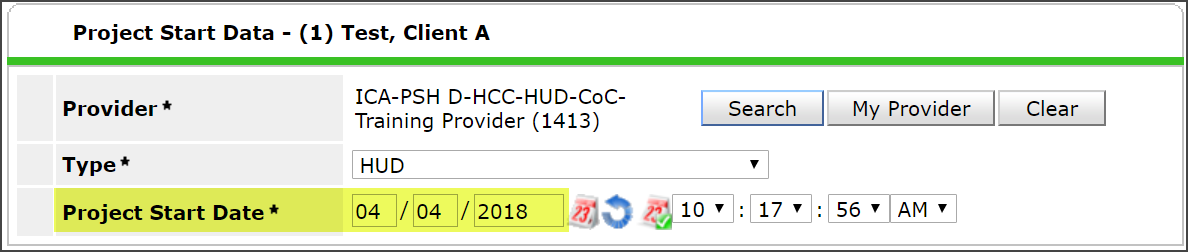
- Project Start Date is entered in the Entry/Exit tab when you create a new entry.
- Pre 10/1/2017, this data element was known as "Entry Date."
- Required for all clients.
Housing Move-In Date: Date household moves into housing.
- It may be the same date as Project Start if the client moves into housing on the date they were accepted into the program.
- Required for the head of household.
- This data element is only required for permanent housing projects, which includes rapid re-housing.
WHERE IN HMIS DO I ENTER THESE DATA ELEMENTS?
Housing Move-In Date is entered at occurrence point and should be entered on the Entry Assessment, via the Interim function in the Entry/Exit tab, or on the Exit Assessment. On most assessments used by permanent housing projects, this data element appears towards the bottom of the assessments - so keep scrolling if you don't see it!

Project Start Date is entered in the Entry/Exit tab when you create a new entry.
WHOOPS! HAVEN'T BEEN DOING THAT ... NOW WHAT?
Both of these changes went into effect on October 1, 2017. Note, however, that a move-in date has been required for Rapid Rehousing Housing projects since 2014 (see the "Evolution of Housing Move-In Date" below for details). If you have continued to use Housing Move-In Date, or some other indicator, for Project Start Date (formerly known as Entry Date), start implementing this change promptly.
- DO start entering Project Start Date as the date following application that the client was admitted into the project.
- DO make sure you enter the Housing Move-In Date for all clients in your permanent housing project since 10/1/2017. If a client was enrolled in your project on 9/30/2017, their Project Entry Date was auto-populated for Housing Move-In Date so there is no need to return to clients that were enrolled 9/30/2017 or earlier. You need to enter a Housing Move-In date for clients in your permanent housing project with a Project Start of 10/1/2017 or later.
- If you have not been creating entry records on "Project Start Date" as defined above, do NOT go back to previous records to update the Project Start Date to be compliant with above direction. If you change the Project Start Date now, data you entered on the Entry Assessment will no longer be associated with the Project Start Date creating a myriad of data quality issues
EXAMPLES
Client A (non-RRH)
Scenario:
- Moved into PSH program 6/1/16
- Project Start Date will be 6/1/16, in accordance with requirements from prior to 10/1/17
- Housing Move-In Date was auto-populated as 6/1/16 when Housing Move-In Date went into effect on 10/1/17
What do I need to do?
Nothing! This is how it was supposed to work when this new data element was implemented.
_______________________________
Client B (non-RRH)
Scenario:
- Accepted into program on 3/1/18, moved into PSH program 4/1/18
- Project Start Date was recorded as 4/1/18
- Housing Move-In Date was recorded as 4/1/18
What do I need to do?
Nothing retroactively. Moving forward, if a client is accepted into the program on 5/1/18 and moves in on 6/1/18, you would record Project Start Date as 5/1/18 and Housing Move-In Date as 6/1/18.
_______________________________
Client C (non-RRH)
Scenario:
- Accepted into program on 3/1/18, moved into PSH program 4/1/18
- Project Start Date was recorded as 4/1/18
- Housing Move-In Date was not recorded
What do I need to do?
Add Housing Move-In Date as 4/1/18. Moving forward, if a client is accepted into the program on 5/1/18 and moves in on 6/1/18, you would record Project Start Date as 5/1/18 and Housing Move-In Date as 6/1/18.
_______________________________
Client D (non-RRH)
Scenario:
- Accepted into program on 3/1/18, moved into PSH program 4/1/18
- Project Start Date was recorded as 3/1/18
- Housing Move-In Date was not recorded
What do I need to do?
Add Housing Move-In Date as 4/1/18. Moving forward, if a client is accepted into the program on 5/1/18 and moves in on 6/1/18, you would record Project Start Date as 5/1/18 and Housing Move-In Date as 6/1/18.
_______________________________
Client E (RRH)
Scenario:
- Accepted into program on 5/1/16, moved into RRH program 6/1/16
- Project Start Date was recorded as 5/1/16, in accordance with requirements from prior to 10/1/17
- Old Residential Move-In Date field was recorded as 6/1/16, in accordance with requirements from prior to 10/1/17
- Housing Move-In Date was auto-populated as 6/1/16 when old Residential Move-In Date field was replaced with Housing Move-In Date field on 10/1/17
What do I need to do?
Nothing! This is how it was supposed to work when this new data element was implemented.
_______________________________
Client F (RRH)
Scenario:
- Accepted into program on 5/1/16, moved into RRH program 6/1/16
- Project Start Date was recorded as 6/1/16
- Old Residential Move-In Date field was recorded as 6/1/16, in accordance with requirements from prior to 10/1/17
- Housing Move-In Date was auto-populated as 6/1/16 when old Residential Move-In Date field was replaced with Housing Move-In Date field on 10/1/17
What do I need to do?
Nothing retroactively. Moving forward, if a client is accepted into the program on 5/1/18 and moves in on 6/1/18, you would record Project Start Date as 5/1/18 and Housing Move-In Date as 6/1/18.
_______________________________
Client G (RRH)
Scenario:
- Accepted into program on 5/1/16, moved into RRH program 6/1/16
- Project Start Date was recorded as 5/1/16, in accordance with requirements from prior to 10/1/17
- Old Residential Move-In Date field was not recorded
- Housing Move-In Date is blank because there was no date to auto-populate when old Residential Move-In Date field was replaced with Housing Move-In Date field on 10/1/17
What do I need to do?
Add Housing Move-In Date as 6/1/16. Moving forward, if a client is accepted into the program on 5/1/18 and moves in on 6/1/18, you would record Project Start Date as 5/1/18 and Housing Move-In Date as 6/1/18.
_______________________________
Client H (RRH)
Scenario:
- Accepted into program on 5/1/16, moved into RRH program 6/1/16
- Project Start Date was recorded as 6/1/16, in accordance with requirements from prior to 10/1/17
- Old Residential Move-In Date field was not recorded
- Housing Move-In Date is blank because there was no date to auto-populate when old Residential Move-In Date field was replaced with Housing Move-In Date field on 10/1/17
What do I need to do?
Add Housing Move-In Date as of 6/1/16. Moving forward, if a client is accepted into the program on 5/1/18 and moves in on 6/1/18, you would record Project Start Date as 5/1/18 and Housing Move-In Date as 6/1/18.